More email sends won’t fix a weak revenue system. To improve email revenue for ecommerce brands, connect cart recovery with relevant landing pages and automations that respond to subscriber behavior. If campaigns get attention but produce few orders, relevance and journey design may be the constraint, not volume.
It’s reasonable to expect email to contribute more when customers already know the brand. But a generic promotion can miss the reason someone subscribed, while a click that leads to an unrelated page adds friction instead of moving a purchase forward.
This article explains why ecommerce email revenue can stay low and how to address the gaps. You’ll learn how to build abandoned-cart messages, match each email link to customer intent, and prioritize welcome, post-purchase, and re-engagement automations. The aim is a more deliberate retention system, one that gives each message a clear job and measures its contribution to profitable growth.
Key Takeaways
- Segment customers by purchase behavior, product interests, location, and customer lifetime value to make messages more relevant.
- Build cart reminders around the items left behind and make the next step clear.
- Test subject lines and preview text, then send each click to a destination that matches the email’s promise.
- Prioritize welcome, post-purchase, and re-engagement automations to support retention beyond one-off campaigns.
1. Why isn’t my eCommerce email marketing generating more revenue?
Email revenue can stall when one broad audience receives the same message. Segment customers by RFM: recency, frequency, and monetary value. Add category affinity, location, and customer lifetime value (CLV), the revenue a customer generates across the relationship. A recent skincare buyer may respond to replenishment, while a first-time apparel shopper needs a different trigger. These distinctions help brands improve email revenue for ecommerce without sending every subscriber the same offer.
Use purchase history to cross-sell related products, not unrelated promotions. A coffee maker buyer may be interested in filters or compatible accessories. Post-purchase emails can share product guidance, invite a review, and recommend relevant items. This connects retention to CLV instead of judging every send by immediate orders.
Map each audience to its customer journey: new subscriber, first-time buyer, repeat customer, or inactive customer. Match the message to that stage and its next useful action. Review engagement and conversion metrics by segment, then adjust content when a group clicks but doesn’t convert. Check that the email experience works on mobile.
Email platforms differ in pricing models, automation features, and revenue attribution. Compare contact- or send-based pricing, behavioral triggers, and how each platform assigns orders to campaigns. The right fit depends on your audience and measurement needs.
For US commercial emails, the CAN-SPAM Act requires senders to make opting out easy. Provide a clear unsubscribe route and honor opt-out requests.
Calculate email revenue by summing orders attributed to email under a consistent attribution model. Separate that figure from total store revenue, and avoid adding overlapping platform reports as if each order were unique.
Improve deliverability with relevant segments, a visible unsubscribe option, and regular list maintenance. Remove subscribers who remain inactive after a win-back effort, and monitor engagement and spam complaints as sending patterns change.
Track clicks, conversion rate, revenue per recipient, and attributed revenue together. Compare those metrics across segments and campaigns using a consistent attribution window. Treat open rates cautiously because they don’t show whether an email generated an order. Prioritize indicators that connect customer behavior to revenue and profitable repeat purchases.
2. Abandoned cart emails
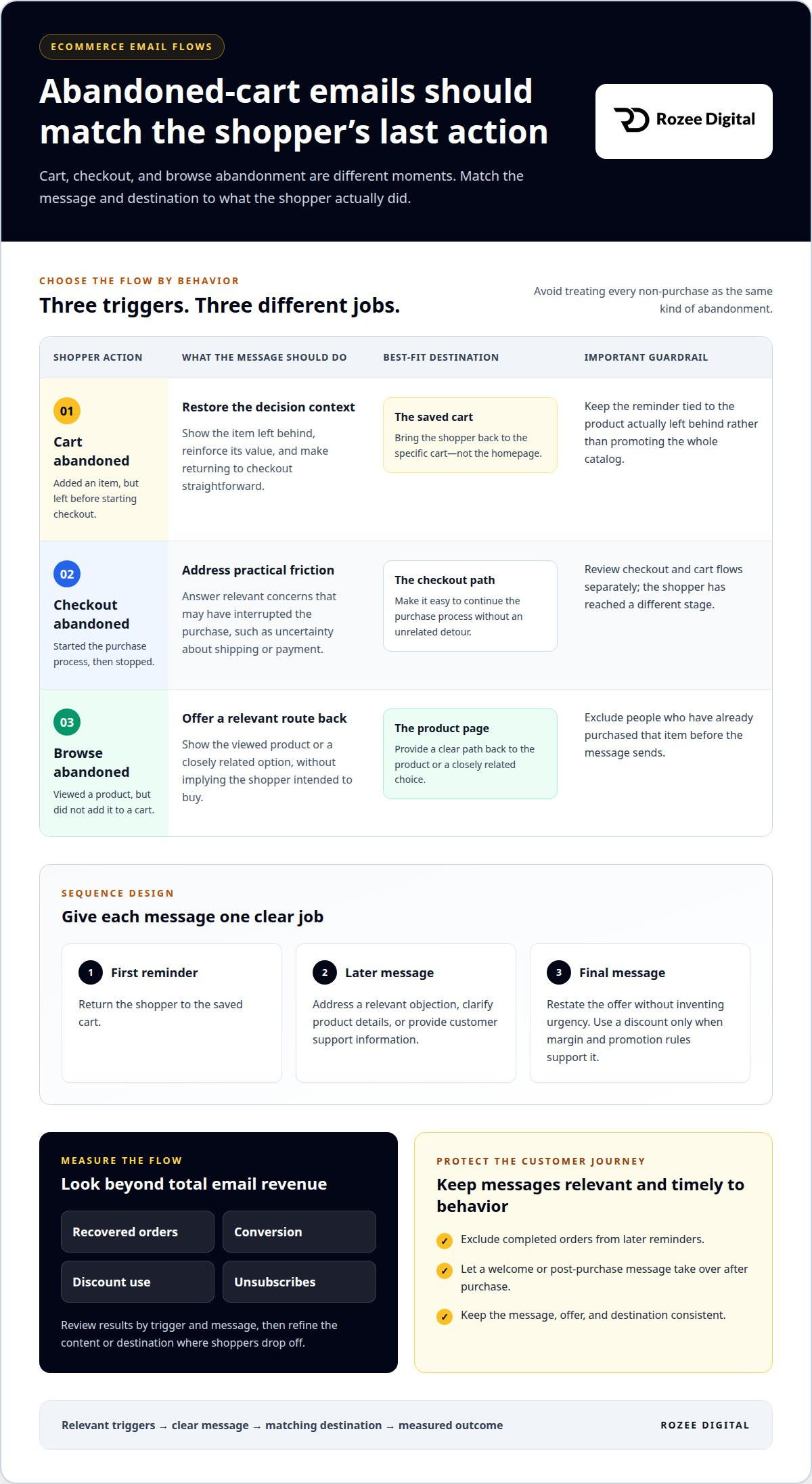
A shopper who leaves a cart hasn’t necessarily rejected the product. A reminder can restore the decision context: show the item, reinforce its value, and make returning to checkout straightforward. Keep the message tied to the product actually abandoned, not a broad promotion for the whole catalog.
Separate cart abandonment from checkout abandonment. A cart reminder addresses someone who added an item but left before starting checkout. A checkout message speaks to someone who began the purchase process and stopped. That distinction changes the useful content: the first can restate product benefits, while the second can address practical friction, such as uncertainty about shipping or payment.
Browse abandonment needs a different trigger. A shopper viewed a product but didn’t add it to a cart, so avoid implying they intended to buy. Show the viewed product or a closely related option, then offer a clear path back to its product page. Exclude people who have already purchased the item before the message sends.
Build a sequence with distinct jobs. The first reminder returns the shopper to the saved cart. A later message can answer a relevant objection, clarify product details, or provide customer support information. A final message can restate the offer without inventing urgency. Use a discount only when margin and promotion rules support it; a blanket incentive can train customers to wait for coupons.
Review analytics by trigger and message, not just total email revenue. Track recovered orders, conversion, discount use, and unsubscribes. Compare cart and checkout flows separately, then refine the message or destination where shoppers drop off. Exclude completed orders from later reminders so a welcome email or post-purchase message can take over.
For brands that need tighter execution across these flows, structured email marketing support can connect triggers, content, and performance measurement.
3. Where should I send customers when they click a link in my email?
Match each destination to the message. A product email should open the product page, while a category campaign should lead to its featured collection. Send cart reminders back to the cart, not the homepage. Keep the path from click to checkout direct, especially on mobile.
Subject lines and preview text set expectations before a click. Test a benefit-led subject against a product-focused version, changing one element at a time. Make preview text add useful context rather than repeat the subject. Evaluate clicks and orders alongside opens, since an intriguing subject can attract attention without producing purchases.
Which subject line, offer, and call-to-action tests have the biggest impact on conversions? Test a clear product benefit against a specific product detail, then compare an offer with a no-discount message. For the call to action, compare direct wording such as “Shop Now” with text that names the featured product. Keep the destination consistent with each version.
Use a controlled A/B test: split comparable audiences between versions, change one variable, and define the success metric before sending. Compare order conversion or revenue per recipient, not several changing measures at once. Apply the result only when the difference is meaningful for the campaign’s commercial goal.
Quality assurance protects the customer experience. Preview reusable templates on desktop and mobile, verify links, product details, images, and offer terms, then send a test message before scheduling. A broken destination or mismatched promotion can undermine an otherwise relevant campaign.
Test sending times against your own audience rather than assuming one schedule fits every customer. Compare delivery windows across comparable campaigns, then assess clicks and orders. Keep the message and audience consistent during the test so timing is the main difference. Use the result to refine future sends and build stronger customer relationships through relevant messages.
4. Core ecommerce email automations
Welcome and cart flows respond to active buying signals; post-purchase and re-engagement flows support retention. Prioritize them according to customer behavior, product buying cycles, and their contribution to orders. An automation sends messages after a defined action or inactivity trigger, giving subscribers a relevant next step without relying on a manual campaign.
Build the welcome flow around the reason someone subscribed. Its first message can deliver a promised offer or introduce the brand. Follow with useful product information, social proof, or a reminder about an unused offer when relevant. Each message should advance the relationship, not repeat the same promotion. Exclude customers from content that no longer fits their status.
Connect post-purchase messages to the product and the customer’s next need. Explain care instructions, share complementary product guidance, or invite a review after the customer has had time to use the item. A later recommendation should relate to what they bought. This makes the next action useful and creates a considered path toward another order.
Re-engagement flows should reflect the subscriber’s last meaningful behavior. A lapsed customer who previously bought repeatedly may merit a different message from someone who only signed up. Offer a relevant reason to return, then stop sending that sequence if the subscriber remains unresponsive. Protect audience quality instead of treating every inactive address as a future sale.
Which ecommerce email flows generate the most revenue? Welcome and cart flows address immediate purchase intent, while post-purchase flows can encourage repeat orders. Compare orders and revenue per recipient by flow, then prioritize based on margin and business value rather than message volume.
Give each automation a clear entry action, purpose, and success measure. Review exclusions and attribution alongside the content; overlapping triggers can send conflicting messages. A structured approach to ecommerce email automation helps teams establish a more coherent lifecycle strategy.
Rozee Digital: Ecommerce ads agency
Rozee Digital helps ecommerce brands address email performance through its Email Marketing Agency and ecommerce advertising services. Turn to the team when cart recovery, customer journeys, and campaign measurement need a more coordinated operating plan, or when paid acquisition and retention are being managed in isolation.
Email should connect to the wider growth model. Align automation priorities with customer behavior and consider how Google Ads and Meta Ads contribute to acquisition alongside repeat purchases. The focus is on growth ownership and clear performance measurement, not adding more sends without a defined role.
If your team is ready to assess its email program and growth priorities, contact Rozee Digital.
Build email into the growth plan
Email revenue is strongest as part of a coordinated commercial system, not an isolated channel. Connect retention priorities with acquisition economics, then assess how each channel contributes to profitable growth. ROAS measures revenue generated against ad spend; MER compares total revenue with total marketing spend; CAC is the cost of acquiring a customer; LTV estimates the value of that customer over time.
For brands using ecommerce advertising alongside email marketing, Google Ads and Meta Ads can support customer acquisition. Assessing these channels alongside email can help when channel decisions are fragmented or email performance lacks a clear place in the wider growth plan. A deliberate operating model can help brands improve email revenue for ecommerce while keeping acquisition and retention accountable to business outcomes.
Contact Rozee Digital to discuss your email revenue priorities. A clearer plan is a practical next move toward more disciplined growth.
Frequently Asked Questions
Why isn’t my eCommerce email marketing generating more revenue?
Revenue often stays low when email reaches the wrong customer with the wrong offer. Sending a first-order discount to a repeat buyer can subsidize a purchase that would happen anyway, while a new subscriber may need product education first. Review results by audience and margin contribution, not only total sales. Also check whether campaign goals match inventory and buying cycles.
Where should I send customers when they click a link in my email?
Send each click to the page that clearly fulfills the email’s promise. A featured product should open its detail page; a multi-item edit can lead to a curated collection. Keep the offer, product, and landing-page message consistent rather than routing every campaign to the homepage. For replenishment, link directly to the item the customer previously ordered.
How can I reduce email unsubscribes?
Make emails predictable, relevant, and easy to control. Set expectations at signup about the types of messages subscribers will receive, then offer preference choices instead of an all-or-nothing option. Suppress recent purchasers from promotions that don’t fit their order. Review unsubscribe patterns by campaign to spot mismatches in content, audience, or sending frequency.
How can ecommerce businesses personalize their emails?
Use signals that change the message, not just the recipient’s first name. For a returning customer, feature compatible accessories; for a new subscriber, explain the product category before presenting an offer. Use catalog availability and prior interactions to avoid promoting items customers already own or can’t buy. Keep recommendations tied to demonstrated interest.
How do I increase my email open rate?
Make the sender identity recognizable and the subject line specific to the email’s value. Pair it with preview text that adds information rather than repeating the subject. Avoid misleading urgency, which can earn an open but undermine trust. Compare results across audience segments and campaign types, since a sale subject may not suit product education.
What are common types of ecommerce emails?
Common types include welcome and promotional emails, cart or browse reminders, order confirmations, post-purchase guidance, replenishment messages, and win-back emails. Each serves a different stage. Transactional updates communicate order status, while marketing messages encourage discovery or another purchase. Choose the message based on the customer’s action, and prevent overlapping automations from firing for the same event.