Google Search ads place paid listings on search results pages when people search for terms related to an advertiser’s keywords. They can appear above or below organic results, and Google labels them as ads. Their role is to capture existing demand, not replace awareness-building elsewhere.
That distinction matters. Search ads can reach people actively looking for a product, but performance still depends on selecting relevant keywords, setting bids around commercial goals, and measuring what happens after the click.
This guide explains how Google Search ads work and how to build a disciplined approach: choose keywords and negative keywords, set bidding strategies, and evaluate results using measures such as return on ad spend (ROAS), customer acquisition cost (CAC), and customer lifetime value (LTV). CAC is the cost of acquiring a customer; LTV is the value a customer generates over time. The guide also compares Search with other ad formats to help you decide how each can support profitable growth.
Key Takeaways
- Review campaign results against conversions and business value, not clicks alone, before changing budgets or ads.
- Choose keywords that reflect shopper intent, then use negative keywords to limit irrelevant traffic.
- Set bidding around the campaign’s performance goal and assess Smart Bidding against the quality of its conversion signals.
- Use Search to reach active demand, and compare it with other ad formats based on the role each plays in the customer journey.
Campaign review, approval, and optimization
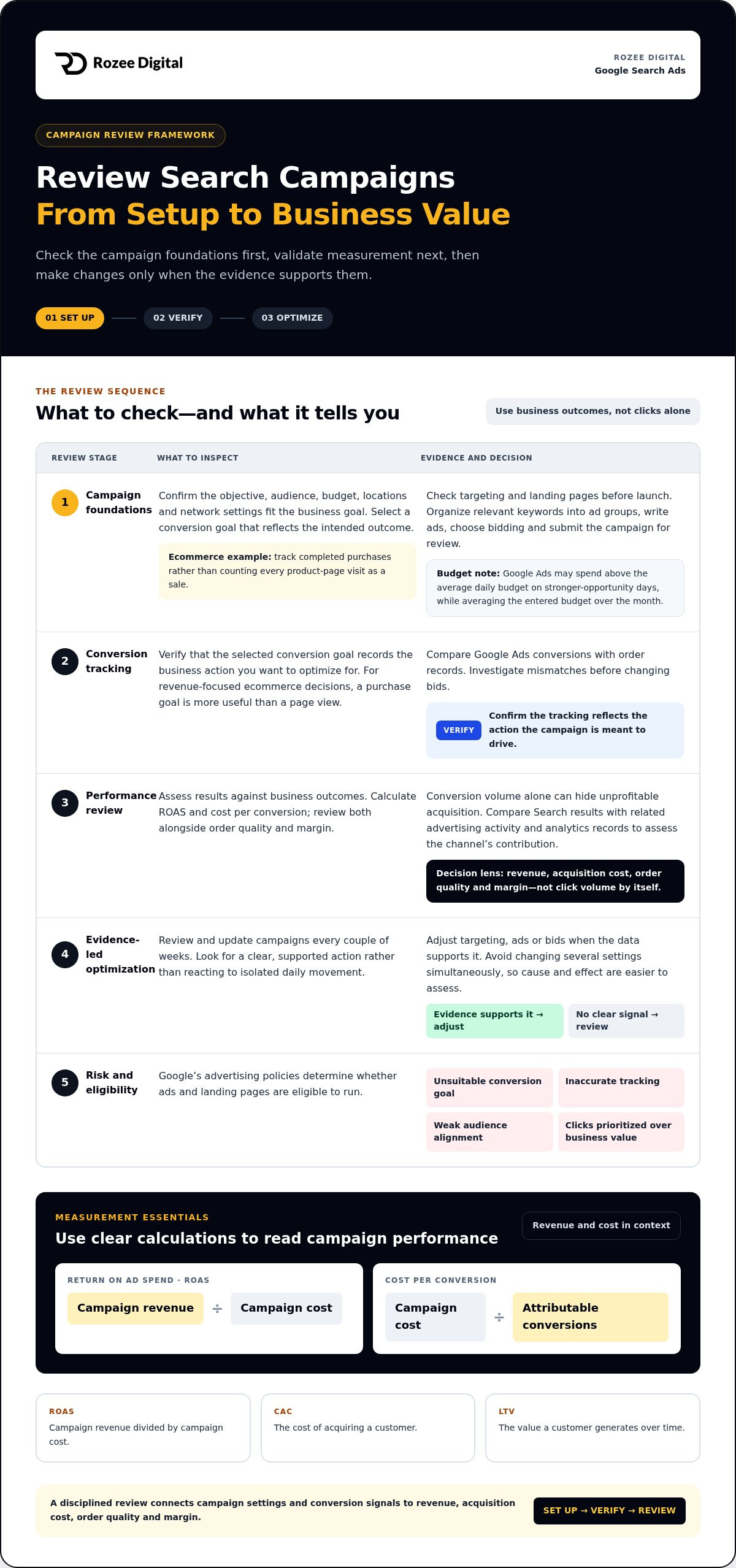
Review performance in sequence: align campaign goals and settings, validate conversion tracking, then evaluate results against business outcomes.
-
Review campaign objectives and settings
In Google Ads, confirm that the campaign objective, audience, budget, locations, and network settings fit the business goal. Choose a conversion goal that reflects the campaign’s intended outcome, even when setting it up without goal guidance. For example, an ecommerce campaign might track completed purchases rather than count every product-page visit as a sale.
To create a Search campaign, select a goal and settings, organize relevant keywords into ad groups, write ads, choose bidding, and submit the campaign for review. Check targeting and landing pages before launch. Google Ads explains that spending can exceed the average daily budget on days with stronger opportunities, while averaging the entered budget over the month.
-
Verify conversion tracking and monitoring
Check that the selected conversion goal records the business action you want to optimize for. Compare Google Ads conversions with order records, and investigate any mismatch before changing bids. When the objective is revenue, a purchase goal is more useful for ecommerce decisions than a page view.
Monitor performance on a consistent schedule. Calculate return on ad spend (ROAS) by dividing campaign revenue by campaign cost. Calculate cost per conversion by dividing campaign cost by attributable conversions. Review both alongside order quality and margin, because conversion volume alone can hide unprofitable acquisition.
-
Optimize campaigns and assess common risks
Make changes based on evidence, not isolated daily movement. Review and update campaigns every couple of weeks, then adjust targeting, ads, or bids when the data supports a clear action. Avoid changing several settings simultaneously, since that makes cause and effect harder to assess.
Google’s advertising policies determine whether ads and landing pages are eligible to run. Common risks include an unsuitable conversion goal, inaccurate tracking, weak audience alignment, and optimizing for clicks instead of business value. Compare Search results with related advertising activity and analytics records to assess the channel’s contribution.
Keyword match types and negative keywords
Build targeting around searches that signal product interest. Match types influence which queries may trigger ads, while negative keywords help exclude irrelevant traffic.
-
Research keywords with Keyword Planner
Use Google Keyword Planner to explore product categories, product names, and the language shoppers use. Treat its keyword ideas and forecasts as planning inputs, not sales projections. For example, a running-shoe retailer could compare category terms with specific product types. Focus on terms related to products you stock and customers you want to reach.
Group related terms by intent before creating ad groups. This helps keep each ad and landing page relevant to the shopper’s query.
-
Choose keyword match types
Choose a match type based on how closely a search should relate to a keyword. Google Ads describes match types as controls for deciding which searches can trigger an ad. Broader targeting can reach related queries, while tighter targeting narrows the range. Review the search terms report to see which queries generated impressions and clicks.
If a keyword for a specific product attracts searches for another category, refine the match type or ad group. Keep closely related keywords together so the ad reflects the searcher’s intent. Unlike display ads, search advertising responds to queries entered into a search engine.
-
Add negative keywords
Use search-term reports to spot queries that generate clicks but don’t match your products or commercial intent. Add clearly irrelevant terms as negative keywords, such as “repair” for a retailer that sells new products but doesn’t offer repairs. Apply exclusions at campaign or ad-group level, depending on where they belong.
Review exclusions alongside new queries. A broad exclusion can block useful searches if it overlaps with a product category or buying phrase. Preserve relevant variations, and remove negative keywords that prevent qualified shoppers from seeing your ad.
- Assess trademarked terms carefully. In 2013, the Tenth Circuit Court of Appeals held in the Lens.com case that buying search ads using a competitor’s federally registered trademark as a keyword did not constitute trademark infringement in that case. Treat that decision as specific to its facts, not blanket approval for every keyword or ad. Consider the query and ad copy when assessing branded terms.
Auction-time bids and Smart Bidding
Set bidding around the outcome that matters, then assess spending against revenue. Search auctions operate separately from display placements, so align each strategy with its campaign objective.
-
Set auction-time bids with Smart Bidding
Choose a bidding strategy that reflects your objective, such as driving purchases or controlling acquisition costs. Google Smart Bidding uses machine learning to set bids automatically at auction time, aiming to meet the campaign’s performance goal. It evaluates signals for each auction rather than applying one fixed bid to every search.
Before enabling automated bidding, confirm that the conversion goal reflects meaningful business value. For an online retailer, completed purchases provide a stronger revenue signal than product-page visits. Review conversion data and goal settings together: inaccurate inputs can steer bidding toward actions that don’t represent commercial success.
Keep Search bidding distinct from display network or shopping campaigns. Their placements and user contexts differ, so assess each against its own goal. A campaign focused on purchase revenue should be evaluated by revenue and conversion quality, not impressions alone.
-
Assess cost per click
Treat cost per click (CPC) as an auction outcome, not a fixed menu price. The auction considers your bid alongside ad quality, competition, and the context of the search. You pay for clicks according to the campaign’s bidding model, and the amount can vary between searches.
Google Ads Quality Score is a diagnostic measure of keyword, ad, and landing-page relevance. Quality signals can influence Ad Rank and the CPC needed to compete, but Quality Score itself isn’t the auction bid. Improve relevance by aligning the search intent, ad promise, and destination page.
Compare CPC with the value of the resulting orders. A lower CPC isn’t a win if the clicks produce no purchases, while a higher CPC may still support profitable revenue. Track conversion quality alongside spending, and adjust bids only when performance data supports the change.
Google search ads and other ad formats
Choose an ad format based on the job it needs to do. Search captures existing intent; other formats can introduce products and build attention before a shopper searches.
- Use Search to meet active demand. A Search ad can appear on Google’s results pages when someone searches for terms related to an advertiser’s keywords. Ads may appear above or below organic results, and Google labels them as ads. Match the message to the query and send shoppers to a page that delivers on its promise.
Keep the distinction clear: advertisers can’t buy better placement in organic Google Search results. Search ads compete for paid placements, while organic listings are separate. Google says most searches show no ads, so relevance matters both for eligibility and for whether an ad appears for a query.
- Build Search copy around the shopper’s immediate need. A standard Search ad can have 1-3 headlines and up to 2 lines of description text. Headlines can contain up to 30 characters each, and description text can contain up to 90 characters. Use that space to state the product or offer clearly, then make the next action apparent.
Add relevant assets, such as sitelinks and images, to responsive search ads. These can provide more information and give shoppers additional ways to reach useful pages. Keep each asset aligned with the campaign message; an irrelevant link weakens the path from query to product.
- Use other formats at different stages of demand. Display advertising can show product imagery to audiences beyond active search queries, while Search responds to a shopper’s typed intent. For example, a retailer can use display to introduce a new product line, then use Search to reach people later looking for that category.
Compare formats by their role, not by impressions alone. Assess whether display helps shoppers discover products and whether Search converts intent into orders. One channel can support another without generating the final click, so consider assisted influence alongside direct conversions and revenue.
Align Search and display around one commercial objective, then assess each format’s contribution. Discuss a paid search strategy when you need to connect campaign structure with profitable growth.
Rozee Digital: Ecommerce ads agency
Rozee Digital helps ecommerce and D2C brands manage paid media, including Google Ads campaigns. Turn to the team when keyword selection, bidding, conversion tracking, and revenue measurement need to work as one operating system, not disconnected tasks.
As a Google Ads Agency and PPC Ads Agency, Rozee Digital supports paid search management. The focus is commercial accountability: connect campaign decisions to purchase outcomes, then assess performance against business priorities. For brands balancing search with social acquisition, Facebook Ads Agency support can also help coordinate paid media activity across channels.
Agency support is most useful when internal teams need dedicated execution or a clearer link between ad spend and ecommerce results. Bring your campaign objectives and measurement priorities into the discussion. Contact Rozee Digital to discuss paid search support for your business.
Turn campaign decisions into a growth system
The next step is to connect paid acquisition decisions with the economics of the business. Set a clear standard for what counts as a valuable customer, then use it to guide investment across channels. That standard should reflect margin, repeat purchase behavior, and the role each campaign plays in bringing customers into the business.
Google Search ads can capture active demand, but durable growth depends on how paid media supports the wider customer journey. Rozee Digital works with ecommerce brands through its Ecommerce ads agency, Google Ads Agency, and Facebook Ads Agency offerings. This can be relevant when campaign management needs to connect search activity with broader acquisition priorities.
Bring your growth priorities and current campaign challenges into the next conversation. Contact Rozee Digital to discuss a paid media approach built around your business objectives. Make the next decision with a clearer view of the full growth system.
Frequently Asked Questions
What are Search ads?
Search ads are paid listings shown in response to a person’s search query. They connect an advertiser’s offer with someone actively researching a relevant product or service. For an online retailer, that could mean presenting a product page to a shopper searching for a specific category. Search ads are separate from organic listings, which advertisers can’t buy their way into.
What Are Google Ads, and How Do They Relate to Digital Advertising?
Google Ads is Google’s advertising platform, which businesses use to create and manage paid advertising across available formats. Search is one format within that broader digital advertising system. For example, an outdoor retailer could use Search to reach people already looking for hiking gear, then use visual advertising to introduce products to audiences who haven’t started a search. Each format should serve a defined business objective.
What are Google Search ads and how do they work?
Google Search ads are paid placements that can appear when a person’s query relates to an advertiser’s keywords. An advertiser sets campaign targeting, writes ad content, and enters an auction when an eligible search occurs. Google considers factors including the bid and ad relevance when deciding whether an ad appears and where. A click can take the shopper to a relevant product or category page.
How much do Google Search ads cost in the United States?
There’s no single fixed cost for a click in the United States. The auction determines cost based on factors such as the advertiser’s bid, competing advertisers, and the ad’s relevance to the search. Costs can vary between queries and over time. Set a budget based on your acquisition economics, then assess whether the resulting traffic and orders support profitable growth.
How do keyword match types and negative keywords work in Search campaigns?
Match types control how closely a search must relate to a keyword before an ad may appear. Standard keywords can match a broad set of related searches by default. Negative keywords exclude searches that don’t fit your offer. For example, a retailer selling new furniture could exclude “repair” if repairs aren’t part of its business, while keeping searches for products it sells.
How can I measure conversions and return on investment from Search ads?
Track valuable actions, such as completed purchases, and connect them to campaign spending. ROAS is advertising-attributed revenue divided by advertising cost. ROI goes further by comparing profit with investment, so include product costs and other relevant expenses. For example, a campaign with strong attributed revenue may still underperform if discounts or product margins leave little profit.