Broad match can reach searches with substantially different wording, while exact match can serve searches with the same meaning as your keyword. Phrase match offers another way to manage reach. Build keywords for Google Ads around what customers are looking for, then use search-term evidence to refine what earns budget.
A longer keyword list isn’t automatically a stronger one. Its commercial value comes from matching intent to the right ad and landing page, while filtering out searches that don’t fit your offer. This guide explains how to build a focused list from your products and categories, choose a match type for each intent, and use actual search terms to refine targeting. You’ll also see how to connect each keyword theme to relevant ad copy and a landing page, so decisions support profitable growth rather than activity for its own sake.
Key Takeaways
- Build your starting list from the products, categories, and customer needs that drive commercial value, then organize related terms into clear themes.
- Choose match types based on the balance of reach and control each keyword needs, rather than applying one setting across the account.
- Review actual search terms to identify useful queries and exclude irrelevant traffic before it consumes more budget.
- Align each keyword theme with ad copy and a relevant landing page, using Quality Score to spot potential relevance or experience issues.
Building seed keyword lists from business offerings
Start with the products and categories that generate revenue, not a list of popular industry terms. For an online skincare store, a seed keyword might be “moisturizer,” which you can expand by product type, ingredient, and customer need. This keeps the list tied to what the business sells and why a customer might search.
Map the offer before opening a keyword tool. Record each product category, distinguishing feature, and relevant buying need. A store selling ceramic cookware, for example, could distinguish cookware types by material and use. Those distinctions create focused seed groups instead of one broad list mixing unrelated searches.
- Start with category names. Use direct terms such as “ceramic cookware” or “running shoes.”
- Add product attributes. Include supported details such as material, color, size, or model.
- Add intent modifiers. Consider terms such as “buy,” “for beginners,” or “gift” when they fit the offer.
- Separate themes. Keep different products and customer needs in distinct groups for review.
Use short-tail terms as category anchors. They usually contain one or two words. Long-tail phrases usually contain three or more words and can express a narrower need, such as “ceramic frying pan with lid.” Choose keyword phrases that clearly match the product and customer need rather than forcing them into a specific length.
Next, use Google Ads Keyword Planner to discover related terms and filter suggestions by location. Set the location to the United States when planning for that market. Google’s historical metrics provide search-volume context, and Google refreshes historical search volume monthly. Treat those figures as planning inputs, then assess actual campaign performance separately.
Finally, qualify every candidate against the catalog. Keep terms that accurately describe an available product and its intended buyer. Remove vague ideas that don’t map to a product, category, or meaningful customer need. The result is a seed list organized for decisions about match types, ads, and landing pages.
Connecting keywords with ads, landing pages, and Quality Score
Organize keywords into ad groups by closely related product, service, or category themes. Keep searches for ceramic frying pans separate from searches for baking trays, so each group can use ads and landing pages that fit its subject.
That structure connects search intent to a clear next step. A query about a specific product should lead to copy that addresses it and a page where customers can find it. A broad category query may suit a category page instead. Keep the promise consistent across keyword, headline, and destination.
Google states that search ads can include up to 15 headlines and four descriptions. Use those assets to identify the product or category, communicate a relevant benefit, and set a clear expectation. Don’t insert a keyword into an ad if the landing page can’t support the claim. Relevance depends on the full path, not keyword insertion alone.
Google identifies expected clickthrough rate, ad relevance, and landing page experience as the components of Quality Score. Use its 1-10 score as a diagnostic signal, not as a target that outweighs conversions or profitability. A mismatch can indicate a quality issue: an ad for “waterproof hiking boots” leading to a general footwear page may give shoppers an unclear next step.
- Check intent: identify the product or information a search suggests.
- Match the ad: make the relevant product or category clear in its copy.
- Review the destination: confirm the page directly supports the ad’s promise.
- Use Quality Score diagnostically: examine its components for possible relevance problems.
Keep the structure manageable. Split an ad group when it combines unrelated products. If a product-specific query lacks a relevant destination, revise the campaign structure or ad before paying for that traffic. This makes results easier to interpret and gives each click a clearer route to the right product.
Google Ads broad, phrase, and exact match types
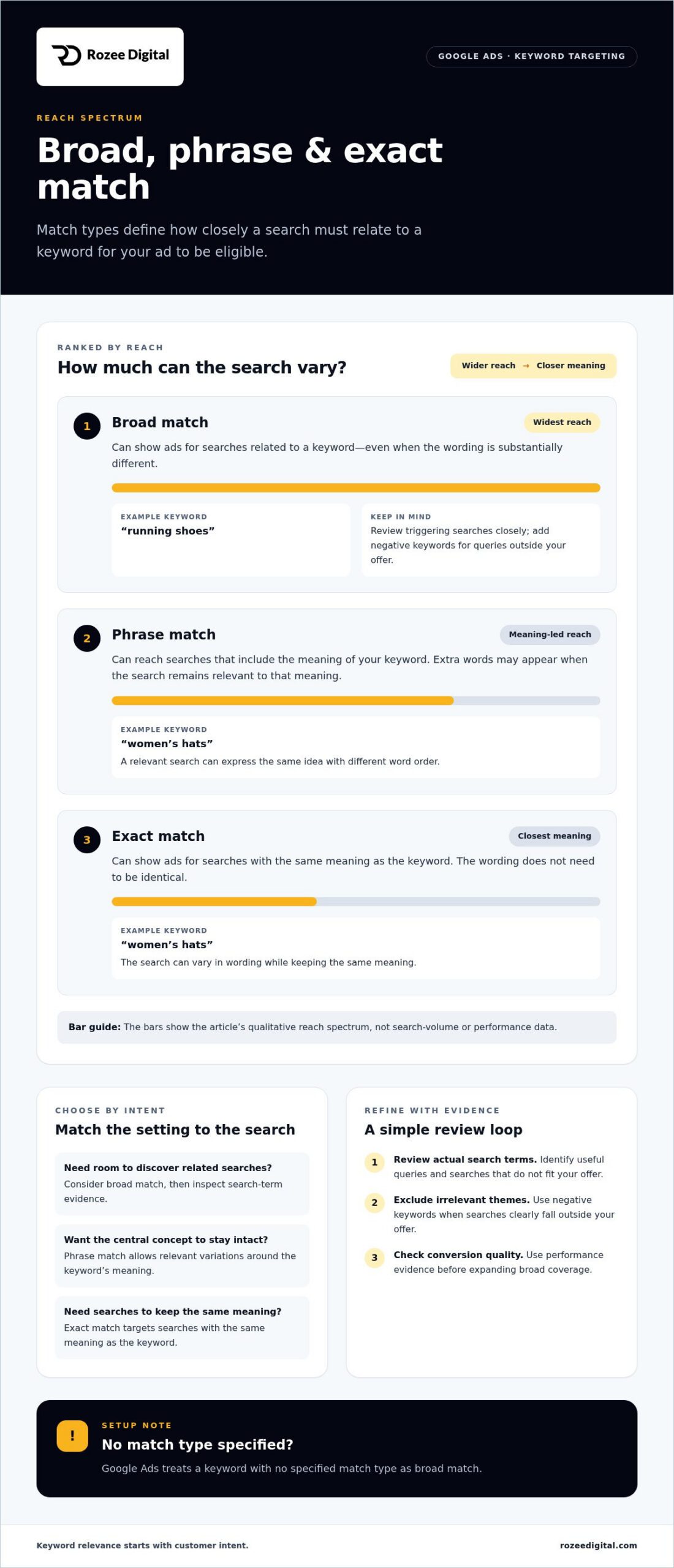
Match types set how closely a search must relate to a keyword for an ad to be eligible. Google Ads offers broad, phrase, and exact match, each providing a different balance of reach and control.
Broad Match Keywords
Google says broad match can show ads for searches related to a keyword, including searches with substantially different wording. For example, “running shoes” could reach related queries expressing similar product intent without using those exact words. That wider reach can help uncover relevant demand, but calls for close review of the searches that trigger ads.
Check search-term evidence and conversion quality before expanding broad coverage. Add negative keywords when queries clearly fall outside your offer, and confirm broader searches still fit the product and destination. Google Ads also treats a keyword with no specified match type as broad match.
Phrase Match Keywords
Google describes phrase match as a way to reach searches that include the meaning of a keyword. Additional words may appear in the search, provided the query remains relevant to that meaning. For example, a phrase keyword about women’s hats can match a search expressing the same idea with different word order.
Use phrase match when the central search concept should remain intact while allowing relevant variations. Review actual search terms for added attributes or use cases, then exclude irrelevant themes with negative keywords. Phrase match manages reach through meaning, not by requiring an exact sequence of words.
Exact Match Keywords
Google says exact match keywords can show ads on searches that have the same meaning as the keyword. The search doesn’t need to reproduce every character in the same order. A keyword such as “women’s hats” can match a query with equivalent intent, even when the wording differs.
Use exact match when a query theme needs tighter control or separate performance analysis. Review search-term reports to see which variations Google considers equivalent. Exact match focuses on meaning, not literal-only matching, so monitor whether those variations fit the product and campaign objective.
How Google Ads Keywords Work
Google Ads uses match types to determine how a search relates to an eligible keyword. Broad can reach related searches, phrase focuses on the keyword’s meaning, and exact can match searches with the same meaning. Match type sets a targeting boundary, while campaign settings and auction conditions also affect ad delivery.
Choose settings based on each keyword’s role. Use broader coverage to explore relevant demand, then review search terms and business outcomes. Reserve tighter targeting for themes that need more control. Negative keywords can help prevent irrelevant searches from wasting budget, while regular reviews keep targeting aligned with your offer.
How do Google Ads keywords work?
A Google Ads keyword helps determine whether a search can trigger an ad. The person’s query, keyword match type, campaign settings, and auction conditions all shape whether that ad appears. A keyword creates eligibility, not a guaranteed impression or sale.
When a search matches an eligible keyword, Google Ads evaluates the advertiser’s bid, budget, ad quality, and targeting. Location settings influence which searches can qualify. Products, customer behavior, and industry conditions also affect campaign performance. That is why the same keyword can produce different outcomes across campaigns.
For example, a retailer targeting “linen duvet cover” may reach shoppers seeking that product. The ad still needs to fit the query, and its destination should show the relevant bedding. If the campaign targets locations where the product isn’t sold, location settings can limit relevant reach.
Keywords also support other campaign contexts. On the Display Network, Google Ads uses keywords to place ads next to content related to those terms. A keyword’s role therefore depends on the campaign type and the context where ads can appear.
Use a repeatable review process to manage that relationship:
- Inspect search terms: compare actual queries with the products and intent your campaign targets.
- Keep relevant discoveries: add useful queries as keywords when they deserve deliberate coverage.
- Exclude poor fits: add negative keywords to prevent irrelevant searches from using budget.
- Assess business outcomes: evaluate conversions and commercial value, not just clicks or impressions.
Keyword costs depend on quality, auction competition, and other factors. A relevant term can still compete in a costly auction, while a low-cost click may have little value if it attracts the wrong shopper. Judge performance against the campaign’s commercial objective, including acquisition cost and conversion quality.
Treat keyword research as ongoing account work, not a launch task. Search behavior, products, and market conditions can change. Review new search terms and campaign performance, then adjust targeting, negative keywords, and budgets to keep the account aligned with current demand.
Rozee Digital: Ecommerce ads agency
Rozee Digital helps ecommerce and DTC brands manage paid media, including Google Ads campaigns built around relevant search intent. Turn to the team when keyword lists, match types, search-term reviews, and landing-page alignment need coordinated management.
Effective growth accountability connects search behavior to commercial priorities. That means organizing keyword themes around relevant products, reviewing which searches trigger ads, and refining targeting when queries don’t fit the offer. The objective is disciplined growth, not simply adding more keywords.
For brands assessing whether external support fits, start with the account’s current constraints: unclear keyword structure, wasted spend on irrelevant searches, or a gap between ads and product pages. Rozee Digital’s Google Ads service can support paid search within a broader ecommerce growth strategy.
Contact Rozee Digital to discuss your Google Ads priorities.
Turn keyword decisions into a stronger growth system
Make keyword decisions part of commercial planning, not an isolated account task. As your catalog, margins, and customer priorities shift, revisit which searches deserve investment and how paid acquisition contributes to profitable growth. A disciplined approach to keywords for Google Ads can keep decisions connected to the business, rather than driven by traffic volume alone.
Rozee Digital supports established ecommerce brands through its Ecommerce ads agency, Google Ads Agency, and Facebook Ads Agency services. This combination helps teams consider search alongside wider paid media, with growth priorities guiding the approach.
If you’re ready to assess how your current Google Ads strategy fits your growth goals, contact Rozee Digital about Google Ads. A clear view of your priorities is a practical starting point for the next stage of growth.
Frequently Asked Questions
How to find keywords for Google Ads campaigns?
Start with product names, category terms, and customer language, then use Google Ads Keyword Planner to expand the list. Enter seed terms or a relevant website and set the location to the United States. For an active account, review search terms for queries already reaching your ads. Keep ideas that describe products you sell, and remove unrelated research before building campaigns.
How to choose keywords based on search intent?
Choose terms that match what the searcher appears ready to do. “How to clean leather sneakers” suggests research, while “buy leather sneakers” signals stronger purchase intent. Match each term to the right destination: educational content for learning queries, and a product or category page for shopping queries. If the page cannot meet the likely need, the keyword is a poor fit.
What is the difference between broad match, phrase match, and exact match?
Broad match can reach related searches with substantially different wording. Phrase match focuses on searches that preserve the keyword’s meaning, while exact match can trigger searches with the same meaning. For example, a retailer might use broad match to explore related demand and exact match to isolate a priority query theme. Choose settings based on the control and discovery each campaign needs.
How much do Google Ads keywords cost per click in the US?
There is no single fixed cost per click for US keywords. The amount depends on keyword quality, auction competition, and other factors, so terms in the same category can differ. Use Keyword Planner estimates as planning inputs, then compare actual spend with conversion value after launch. A cheaper click is not automatically more profitable if it attracts shoppers unlikely to buy.
How to use negative keywords in Google Ads?
Add a negative keyword when a search term clearly conflicts with your products or customer intent. For example, a store selling new furniture could exclude searches for used furniture if those shoppers aren’t relevant. Review actual queries before excluding terms, since a broad exclusion can block useful searches too. Revisit the list as your catalog and campaign coverage change.
How to optimize Google Ads keywords using conversion and search-term reports?
Compare the search terms triggering ads with recorded conversions, then separate relevant queries that produce sales from those that spend without useful outcomes. Add strong, distinct queries to the appropriate campaign, and exclude clearly irrelevant ones. Check conversion tracking before making major changes: incomplete purchase data can make an effective keyword appear weak and lead to poor budget decisions.