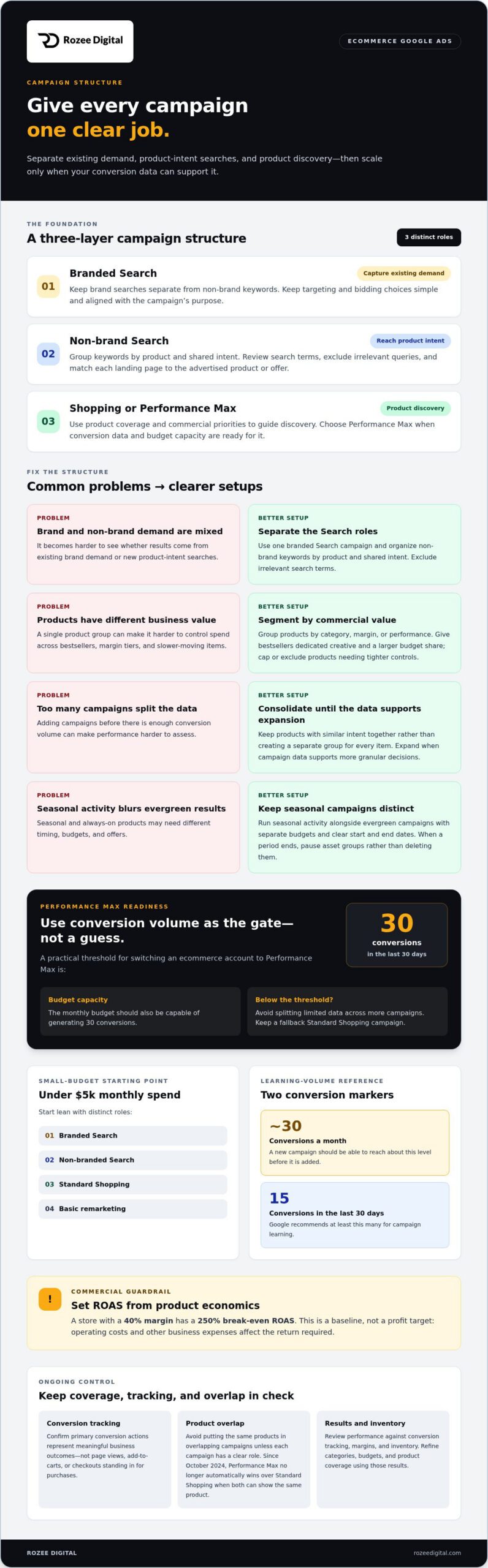
The best Google Ads campaign structure for ecommerce isn’t one oversized Performance Max campaign. Build three layers: branded Search to capture existing demand, non-branded Search to reach shoppers by product intent, and Shopping or Performance Max for product discovery. Treat Performance Max as a readiness decision: a practical threshold is 30 conversions in the last 30 days before switching.
This structure gives each campaign a clear role. It also makes product coverage, budgets, and measurement easier to control, rather than asking one campaign to solve every growth challenge.
Campaign type is only part of the decision. The right setup depends on your catalog, margins, conversion volume, and ability to provide relevant product assets. This guide explains how to assign campaign roles, when a lean, Shopping-led structure may fit better, and how to expand as reliable data builds.
You’ll have a practical framework for choosing a structure that fits your store now, rather than copying an account architecture designed for a different stage of growth.
Key Takeaways
- Assign distinct roles to Search, Shopping, and Performance Max so each campaign supports a clear growth objective.
- Use conversion volume, product margins, and catalog priorities to decide when Performance Max is ready to scale.
- Keep a small-budget setup focused, then expand only when campaigns generate useful performance data.
- Review product overlap, conversion tracking, and campaign results regularly to keep account structure aligned with business value.
1. Performance Max readiness and campaign organization
Segment products by category, then separate branded Search from non-brand demand. In Performance Max, group products by margin or performance. Run seasonal activity alongside evergreen campaigns, with separate budgets and defined start and end dates.
Readiness depends on conversion data and budget capacity. A practical threshold is 30 conversions in the last 30 days before switching an ecommerce account to Performance Max. Your monthly budget should also be capable of generating 30 conversions. Below that level, adding more campaigns can split available data and make performance harder to assess.
For a larger catalog, group products by commercial value. Give bestsellers dedicated creative and a larger budget share. Separate categories when they need different messaging, landing pages, or budget controls. Cap or exclude lower-margin, specialty, and slow-moving products from Performance Max when they require tighter spending controls. Standard Shopping can cover those products instead.
Keep brand Search separate from non-brand keywords. For branded Search, keep targeting and bidding choices simple and aligned with the campaign’s purpose. For non-brand Search, group keywords by product and shared intent. Review search terms, exclude irrelevant queries, and shift budget toward product groups that support business value. Match each landing page to the advertised product or offer.
Build Performance Max asset groups around related product themes, not audience membership. Keep similar products together so images, headlines, and destination pages support the same offer. Run seasonal campaigns alongside evergreen activity, with separate budgets and clear start and end dates. When a seasonal period ends, pause its asset groups rather than deleting them, so conversion data remains available for future cycles.
Review campaign performance regularly against conversion tracking, margins, and inventory. Keep a fallback Shopping campaign, and avoid placing the same products in overlapping campaigns without a clear role. Since October 2024, Performance Max no longer automatically wins over Standard Shopping when both can show the same product. Use results to refine categories, budgets, and product coverage.
2. Is Google Ads worth it for your store?
Google Ads is worth testing when you can connect results to contribution margin, not just clicks. Start with branded Search, non-brand Search, Shopping, and basic remarketing, giving each campaign a distinct role. This helps show whether revenue comes from existing demand, product discovery, or returning visitors. An account becomes harder to assess when campaigns multiply faster than their conversion data.
Create separate campaigns for different countries when markets need distinct targeting, budgets, or performance controls. Match each market’s keywords, ad language, landing pages, and currency to the offer shoppers actually see. Keep the hierarchy clear: account, campaigns, ad groups, then keywords and ads.
Audit findings show why that separation matters. In an audit of 122 ecommerce accounts, 36 included brand searches in non-brand campaigns, while 51 had no product segmentation. Of 84 accounts running Performance Max, 64 had at least one issue. These findings point to operational risks, not a universal verdict on Google Ads. Check whether each campaign has a defined purpose, accurate conversion tracking, and product coverage that matches the store.
Tracking deserves particular attention. An audit of 122 ecommerce Google Ads accounts found conversion tracking issues in 66 accounts over the last 2 years. In 27 accounts, page views, add-to-carts, or checkouts counted as primary conversions. Those actions can distort optimization if they stand in for completed purchases. Confirm that primary conversion actions represent meaningful business outcomes before judging actual campaign performance.
Then review search terms and campaign overlap. Exclude irrelevant queries, separate brand intent from non-brand intent, and verify that the same products aren’t competing across campaigns. An audit found 20 accounts using automated bidding for brand Search and 29 running more campaigns, countries, or asset groups than their conversions could support. More structure isn’t automatically better. For ongoing paid search campaign management, focus on whether each campaign has enough data to justify its role.
3. Shopping campaigns for small-budget ecommerce
For stores spending under $5k monthly, start with branded Search, non-branded Search, Standard Shopping, and basic remarketing. This lean structure separates existing demand from product discovery without dividing budget across too many campaign types. Prioritize a focused product range, then expand coverage when campaign data supports more granular decisions.
Your feed determines how clearly Shopping can represent each product. Write descriptive titles that identify the product and relevant attributes. Use custom labels to distinguish business groups, such as bestsellers, margin tiers, or inventory priorities. Then organize product groups around those labels, so bids and exclusions reflect commercial value rather than arbitrary catalog divisions.
A small budget needs enough conversion volume to support each campaign. A new campaign should be able to reach about 30 conversions a month before it is added. Google recommends at least 15 conversions in the last 30 days for campaign learning. If those thresholds are difficult to reach, consolidate products with similar intent instead of creating a separate ad group for every item.
Set a target ROAS from product economics, not a competitor’s benchmark. A store with a 40% margin has a break-even ROAS of 250%. That figure is a baseline, not a profit target: operating costs and other business expenses affect the return required. Keep the daily budget aligned with the target CPA, with at least one target CPA per day for each campaign.
Make controlled adjustments. Change a ROAS target in steps of about 20%, then allow two weeks per change before evaluating results. If demand differs by product intent, separate Shopping into 2 campaigns for upper-funnel, lower-intent traffic and mid- or high-intent traffic. Use that split only when budget and conversion volume can support both. Otherwise, keep one Standard Shopping campaign, optimize feed quality, and review product groups against actual conversions, margins, and inventory.
4. Three-layer ecommerce campaign structure
A useful three-layer model separates demand capture, product evaluation, and audience expansion. Give each layer a distinct purpose, budget logic, and measurement approach. This is easier to optimize than a flat set of campaigns competing for attention.
Layer one captures intent. Use branded Search for shoppers looking for your store and non-branded Search for product-specific queries. Add negative keywords to non-brand campaigns to filter out branded searches and unrelated terms. Group keywords by product and shared intent, then direct each group to a matching landing page.
Layer two organizes product demand. Group Shopping products by category, margin, or performance when those differences call for separate budget decisions. For example, give strong sellers distinct coverage while keeping lower-margin products under tighter control. Make product assignments clear so an item does not appear in multiple campaigns without a deliberate reason. Standard Shopping can complement Performance Max.
Layer three expands reach. Performance Max can support product discovery when conversion volume and assets are ready. At $25k+ monthly, a scaling structure can combine Performance Max organized by margin or product group, Search, a Shopping fallback, Demand Gen or YouTube, and segmented remarketing. Keep retargeting separate from prospecting, so returning shoppers don’t obscure new-customer demand.
Across all three layers, maintain accurate conversion tracking and assess results against business value. Regularly review search terms, product coverage, and bidding targets. Automated bidding can optimize only for the signals and goals your account provides. A clear structure makes those signals easier to interpret, while regular reviews help identify where spend captures demand and where adjustments are needed.
Build a structure around your store’s commercial priorities with ecommerce campaign support.
Rozee Digital: Ecommerce ads agency
Rozee Digital helps ecommerce brands manage paid media through its ecommerce ads agency and Google Ads Agency services. Turn to the team when campaign roles overlap, product segmentation lacks commercial logic, or performance data isn’t guiding budget decisions.
A disciplined account structure connects search intent, product priorities, and conversion tracking. Rozee Digital’s PPC Ads Agency support can help align campaign management with store objectives, while Facebook Ads Agency services extend paid media planning across another channel. The focus is operational clarity: defined campaign roles, meaningful measurement, and decisions tied to business performance.
To discuss your ecommerce advertising needs, contact Rozee Digital.
Make your next campaign decision count
Your account structure should evolve with the business, not become a permanent diagram. As product priorities, margins, and demand change, reassess whether each campaign still has a distinct commercial role. The right Google Ads campaign structure for ecommerce is one your team can measure, govern, and adjust against business objectives.
That work requires more than launching campaigns. It requires disciplined paid media management and decisions grounded in meaningful performance data. Rozee Digital offers ecommerce advertising through its Ecommerce ads agency and Google Ads Agency, with Facebook Ads Agency support when paid social also fits your growth plan.
Bring your current campaign goals and business priorities into the next planning conversation. Contact Rozee Digital to discuss your campaigns and identify the structure that best supports your store’s next stage.
Frequently Asked Questions
Which is the best Google Ads structure and when to use one?
The best structure depends on catalog breadth, purchase intent, and how much control each product line needs. A single-product store can keep its account compact, while a varied catalog may need clearer product and market divisions. For a sound Google Ads campaign structure for ecommerce, create a new campaign only when it needs a distinct budget, targeting, or commercial objective. Otherwise, keep related activity together.
How much should you spend, and which bidding strategy should you use?
Set your budget by working backward from allowable acquisition cost, product margin, and expected order value. Choose bidding based on the quality of your purchase data: value-based bidding suits stores with reliable order values, while conversion-focused bidding may suit stores where orders have similar value. For example, don’t optimize for checkout starts if completed purchases are the actual business outcome.
Is Google Ads worth it for your store?
Google Ads is worth evaluating when shoppers search for products you can fulfill profitably and your store can measure completed purchases. Compare acquisition cost with contribution margin, not revenue alone. A store with strong demand but limited stock may need tighter product controls; a store seeking new customers should distinguish product discovery from branded demand. Base the decision on unit economics and advertising’s role in growth.
What are STAGs, SKAGs, and SIAGs?
STAGs are single-theme ad groups, SKAGs are single-keyword ad groups, and SIAGs are single-intent ad groups. A STAG might group searches for a product category; a SKAG focuses on one keyword; an SIAG groups different phrases with the same intent, such as comparing similar products. Choose a structure that keeps ads and landing pages relevant without splitting data into groups too small to assess.
What are the most common Google Ads mistakes in ecommerce accounts?
Common mistakes include treating revenue as profit, optimizing for low-value actions, and sending broad product searches to generic pages. A shopper searching for a specific model, for example, should land on that product page, not a general category page. Other pitfalls include promoting out-of-stock items, ignoring search terms, and assessing performance without accounting for returns, discounts, or product-level margins.
What needs to be in place before you run any campaign?
Before launch, verify that purchase tracking accurately records completed orders and their values. Check that product pages load, checkout works, and advertised products match their landing pages. Review feed titles, availability, and product details for consistency with your store. Define the campaign’s business objective and the metric that reflects success. Without these foundations, results may look measurable while leading to the wrong decisions.