A post-purchase email flow is an automated sequence that starts when a customer places an order and runs through delivery, first use, review and the second order. For a brand whose customer acquisition cost keeps climbing, it is the cheapest revenue on the account, because the customer has already paid you once. This guide gives the emails, the timing, the segmentation and the numbers to watch. Rozee Digital builds these flows as part of retention work for established Shopify, WooCommerce and Magento brands.
TL;DR
- A post-purchase flow is triggered by an order. A welcome sequence is triggered by a signup. They are two different jobs and need two different flows.
- A strong starting structure is four to six emails across the first 30 days: confirmation, shipping, delivery and usage help, review request, a relevant second-purchase prompt, and a loyalty or referral nudge.
- Segment at minimum by first-time versus returning buyer and by product, so every email matches what the customer actually bought.
- Judge the flow on repeat purchase rate, revenue per recipient and profit, not on open rates alone.
Table of Contents
- What a post-purchase flow is, and how it differs from a welcome sequence
- Why the flow matters for profit
- The emails to include, in order
- How many emails, and how often
- Tailor the flow to the product and the buyer
- Keep transactional and promotional emails separate and compliant
- Measure the flow by profit, not opens
- Common mistakes
- Get the flow built and tuned
- Where post-purchase email fits in retention
- FAQ
- Sources
What a post-purchase flow is, and how it differs from a welcome sequence
A post-purchase flow begins when a customer places an order. Klaviyo’s help center describes it as a sequence triggered by an order, built to improve loyalty and retention and drive repeat purchases. The customer is already a buyer, so the emails do not need to sell the brand. They need to make the product work for the customer, and then make the next order easy.
A welcome sequence is different. It starts when someone joins your list, often through a pop-up or a checkout opt-in, and it introduces the brand and usually offers a reason to place a first order. Shopify’s overview of ecommerce email automation draws the same line: welcome emails serve a new subscriber, while post-purchase emails follow a transaction.
The practical rule is to keep them apart:
- Welcome sequence: audience is subscribers who have not bought. Goal is a first order. Typical content is brand story, best sellers, social proof and an incentive if your margin allows one.
- Post-purchase flow: audience is people who have just bought. Goal is a good first experience, then a second order. Typical content is order information, setup help, a review request and a relevant next product.
If you send a buyer the welcome offer after they have already paid full price, you train them to wait for discounts and you cut your own margin. Your platform should exclude anyone who has placed an order from the welcome sequence, and the post-purchase flow should take over at that moment.
A few terms used below:
- CAC (customer acquisition cost): total sales and marketing spend divided by the number of new customers won.
- LTV (lifetime value): the gross profit a customer brings over their relationship with you, not just the first order.
- ROAS (return on ad spend): revenue attributed to ads divided by ad spend.
- MER (marketing efficiency ratio): total revenue divided by total marketing spend, across all channels.
Post-purchase email works on the LTV side of the equation. Every additional order from an existing customer lowers the effective CAC of that customer and lifts MER, without buying another click.
Why the flow matters for profit
Paid media gets the first order. Whether that order pays back depends on what happens next. When CAC rises, a brand that only monetizes the first purchase has two options: accept thinner margins or cut spend. A brand with a working post-purchase flow has a third: let more customers return and spread the acquisition cost across more orders.
The gap between a bare receipt and a real sequence can be large. A May 2026 report from Online Store News on a study of 2,400 Shopify stores found that merchants sending only a single order confirmation earned an average of $0.23 in extra revenue per recipient, while those running multi-touch sequences averaged $2.47 per recipient over 30 days. Treat that as a directional benchmark. Your product, price point and repurchase cycle decide where you land.
The emails to include, in order
The structure below is a starting point built from how most DTC catalogs behave. Adjust the day counts to your product’s natural usage cycle.
| Trigger and timing | Job | |
|---|---|---|
| 1. Order confirmation | Immediately after the order | Reassure and set expectations |
| 2. Shipping confirmation | When the label is scanned | Give tracking, reduce support tickets |
| 3. Delivery follow-up | 1 to 2 days after delivery | Help the customer use the product |
| 4. Review request | About 5 to 7 days after delivery | Collect reviews and feedback |
| 5. Second-purchase prompt | About 14 to 21 days after delivery | Cross-sell or replenish |
| 6. Loyalty or referral nudge | About 30 days after delivery | Deepen the relationship |
The schedule is a hypothesis to test, not a rule. A coffee brand might replenish at day 21. A mattress brand has no reason to email about a second purchase for years, so its flow should focus on care, reviews and referrals.
1. Order confirmation
This is a transactional email, and it is usually the most-read message your store sends. Include the order number, items, total charged, shipping address, a realistic processing and delivery window, and a clear way to reach support. Add one line that tells the customer what happens next. Keep promotion minimal here. A single line pointing to a product guide is fine. A banner for a discount code on the receipt is not.
2. Shipping confirmation
Send it when the carrier scans the package, with the tracking link above the fold. Customers open this email repeatedly, so it is the most reliable place for a short, useful tip, such as how to prepare for first use.
3. Delivery follow-up and usage help
This email is the one most brands skip, and it is where the flow earns its keep. Confirm that the product arrived, then show how to get the result: a setup video, a sizing guide, a three-step quick start, or care instructions. For a product with a learning curve, this email prevents returns and negative reviews before they happen.
4. Review request
Ask after the customer has had time to use the product. For fast-use goods such as skincare or food, that can be a few days after delivery. For durable goods, wait longer. Make the review one tap from the email, and ask a simple question first: how is it going? Customers who report a problem should go to support, not to a public review form. Reviews then feed your product pages and your ads, and online reviews influence e-commerce sales in ways that carry through to paid traffic conversion.
5. Second-purchase prompt
This is the revenue email. Recommend something that follows from what was bought: a refill, a matching accessory, the next step in a regimen. Generic “you may also like” blocks perform worse than a single, logical pairing. If you cannot name why the second product fits the first, do not send the email.
6. Loyalty or referral nudge
Around day 30, invite the customer into your loyalty program or give them a referral link. By now they have received, used and judged the product, so the ask is credible. This email also feeds the longer lifecycle program covered in our guide to lifecycle email marketing for ecommerce brands.
How many emails, and how often
Start with four to six emails over 30 days and let the data move you. The risk is not sending too few emails. It is sending emails that do nothing for the customer. Three of the six above are transactional or service messages. The marketing ones, the review request, the second-purchase prompt and the loyalty nudge, are the ones to watch for fatigue.
Some working rules:
- Space marketing emails at least a few days apart. Never stack a review request and a cross-sell in the same 48 hours.
- Pause the flow if the customer buys again. A repeat buyer should leave the sequence and enter a returning-customer track.
- Suppress people who contacted support. A customer with an open complaint should not receive a cross-sell.
- Watch unsubscribe and spam complaint rates by email. If one message spikes, rewrite or remove it.
Tailor the flow to the product and the buyer
One flow for every order is the most common reason post-purchase email underperforms. You have two cheap levers.
Order count. A first-time buyer needs reassurance and onboarding. A third-time buyer needs neither. Klaviyo’s guide quotes Toccara Karizma of Karizma Marketing recommending that subscribers be segmented by order count, so returning customers get a different experience after every purchase than first-timers. In practice, that means a branch right after the trigger: first order goes to the full onboarding flow, repeat orders go to a shorter one that skips setup and moves straight to replenishment or loyalty.
Product or category. Split the flow by what was in the cart. A customer who bought a consumable gets a replenishment timeline. A customer who bought equipment gets a how-to and an accessory suggestion. A customer who bought a gift may not be the end user, so ask for the recipient’s feedback instead.
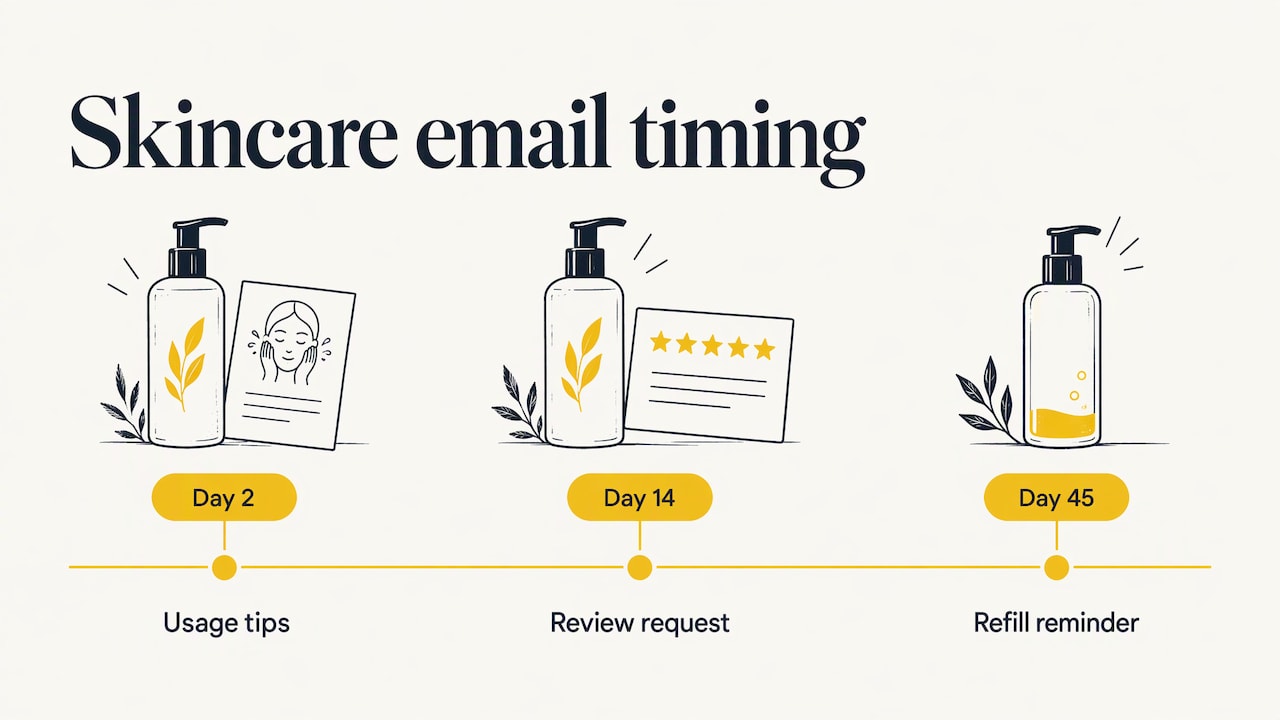
A hypothetical example, for illustration only: a DTC skincare brand sells a 60-day cleanser. Its flow sends usage tips at day 2 after delivery, a review request at day 14 when results begin to show, and a refill reminder at day 45, 15 days before the bottle runs out. Each timing comes from the product’s use cycle, not from a template.
Beyond that, add behavior: if the customer clicked the usage guide, skip the reminder to read it. If they did not open the review request, send one shorter reminder, not three.
Keep transactional and promotional emails separate and compliant
Transactional messages, such as confirmations and shipping updates, carry a different legal status from marketing. In the US, the FTC’s CAN-SPAM compliance guide for business says the law covers all commercial email, not only bulk sends, and that the law has no exception for business-to-business messages. It also lists rules that apply to commercial messages: accurate header information, a subject line that reflects the content, and a working way to opt out. The same guide says a message can go without an unsubscribe link only if its primary purpose fits one of the Act’s categories of transactional or relationship messages.
The consequence for your flow: once a message mixes a receipt with a heavy promotion, its primary purpose can become commercial. Keep the confirmation and shipping emails focused on the order, with at most a light mention of other content. Put the real promotion in the review, cross-sell and loyalty emails, which should carry an unsubscribe link and your physical address. If you sell to customers in other countries, check the rules there as well, since email consent law differs by country. Your legal counsel should confirm how this applies to your program.
To avoid overwhelming customers:
- Give each email one purpose and one main button.
- Write subject lines that say what is inside, such as “Your order is on its way” rather than a teaser.
- Let customers set frequency or opt out of the marketing tail while still receiving order updates.
- Cap the number of automated marketing emails a person can receive in a week across all flows, including abandoned cart and browse flows. A shared frequency cap is more effective than tuning each flow in isolation.
Measure the flow by profit, not opens
Open rates are unreliable as a primary metric because mail privacy features inflate them. Use these instead:
| Metric | What it tells you |
|---|---|
| Repeat purchase rate within 60 or 90 days | Whether the flow, and the product, bring customers back |
| Revenue per recipient | Value of each person who enters the flow |
| Click-to-order rate on the second-purchase email | Relevance of the recommendation |
| Review completion rate | Health of the review request |
| Support contacts per 100 orders | Whether shipping and usage emails reduce friction |
| Unsubscribe and complaint rate by email | Whether you are overmailing |
Then connect the results to the P&L. Revenue per recipient only matters after discounts, shipping, returns and product cost. A flow that drives repeat orders by giving 20% off on every second purchase may raise revenue and lower profit. Track contribution margin on flow-attributed orders, and compare cohorts: customers who entered the flow against a holdout group that received only transactional emails. The holdout test shows what the flow adds, rather than what customers would have bought anyway.
Set a review cadence. Check each email’s performance monthly, change one variable at a time, and give a test enough orders to mean something before declaring a winner. Small brands with few orders should test the biggest levers first: the timing of the second-purchase prompt, and the product it recommends.
Common mistakes
- Treating the confirmation as the whole flow. A receipt alone leaves the most valuable window after purchase empty.
- Cross-selling too early. A customer who has not received the product cannot want an add-on to it.
- Asking for a review before delivery. Base the timer on delivery, not on order date, so slow shipments do not trigger the request.
- Sending the welcome offer to buyers. This undermines margin and confuses the customer.
- Ignoring returns and support signals. Suppress marketing for customers who are mid-return.
- Never testing. The timing in any guide, including this one, is a starting hypothesis.
The way we see it
Most brands we talk to treat email as a discount machine that sits next to paid media. We see it differently. The post-purchase flow is where acquisition, conversion and retention meet: the ad earned the customer, the site converted them, and the flow decides whether they come back.
That is why we do not build flows in isolation. Our Ecommerce Acceleration System™ looks at acquisition, conversion and retention together, with profit as the measure. A flow that adds revenue but erodes margin is not a win, and a flow that lowers the effective CAC of every new customer is worth more than another round of ad spend.
It also needs senior judgment. Deciding which product to recommend on day 18, when to hold a message back, and how to read a holdout test are strategic calls. At Rozee Digital, senior strategists lead client work and we keep our client roster small so we can go deep on each brand’s data.
Tom
Get the flow built and tuned
If you already invest in paid media and want the post-purchase flow to pull its weight, our Klaviyo setup and optimisation service covers building and improving the flows that turn first orders into repeat customers. Rozee Digital works with established Shopify, WooCommerce and Magento brands, and the work is led by senior strategists.
For a wider view of how these flows fit with cart recovery and retention, read our guide to email flows that recover carts and support ecommerce retention, or see the Rozee Digital services overview to talk about your account.
Where post-purchase email fits in retention
A post-purchase flow is one part of a broader retention program. Welcome sequences capture subscribers, cart and browse flows catch intent, post-purchase flows grow the first order, and win-back flows pull in lapsed buyers. For the full picture, see our walk-through of ecommerce lifecycle email marketing from welcome to checkout. For the logic behind why a good experience after the sale encourages repeat orders, this practical guide to improving customer retention explains how the post-sale period shapes loyalty.
FAQ
How many emails should a post-purchase flow have?
Four to six emails across the first 30 days is a sound starting point. Include the transactional messages (confirmation, shipping, delivery) and two or three marketing emails, such as a review request, a second-purchase prompt and a loyalty nudge. Then adjust based on unsubscribes, repeat purchase rate and your product’s usage cycle.
What is the difference between a post-purchase email sequence and a welcome email sequence?
The trigger. A welcome sequence starts when someone subscribes and tries to win a first order. A post-purchase sequence starts when someone buys and tries to earn a second order. Customers who have bought should leave the welcome sequence and enter the post-purchase flow.
When should I ask for a review?
After the customer has had time to use the product, which is commonly several days after delivery for fast-use products and longer for durable ones. Base the timer on the delivery event, not the order date, and route any customer who reports a problem to support first.
Do I need an unsubscribe link in order confirmation emails?
Not always. Under the FTC’s CAN-SPAM guidance, a message whose primary purpose is transactional or relationship-related can go without one. Once a message is mainly promotional, it needs the full commercial requirements. Keep receipts focused on the order and confirm your setup with legal counsel.
Sources
- How to create a post-purchase flow, Klaviyo Help Center
- Ecommerce email automation types, examples and tips, Shopify
- Post-purchase email guide, Klaviyo
- CAN-SPAM Act: A Compliance Guide for Business, FTC