Ecommerce email automation is a set of workflows that send the right message after a shopper does something: signs up, views a product, abandons a cart, or buys. Start with four flows (welcome, browse abandonment, abandoned checkout, post-purchase), set clear triggers and exit rules, and judge them by revenue per recipient and repeat purchase, not open rates. This guide covers what to build, how to configure it, and how to measure it for established Shopify, WooCommerce and Magento brands.
TL;DR
- Automations are triggered by shopper behavior, while campaigns go out on a calendar. That difference is why flows earn more per send.
- Build welcome, browse abandonment, abandoned checkout and post-purchase flows first, then add replenishment, win-back and loyalty.
- Every flow needs a trigger, a delay, a message, audience conditions and an exit rule that stops it after purchase.
- Measure revenue per recipient, placed-order rate, second-order conversion and incrementality against a holdout. Treat open rates cautiously.
- Authenticate your sending domain and honor unsubscribes, or the best flows never reach the inbox.
Table of Contents
- What ecommerce email automation is
- The flows to build, in order
- How to set up an automation
- Segmentation and personalization that matter
- Measure profit, not just clicks
- Protect deliverability and follow the rules
- Keep improving after launch
- Choosing an automation platform
- Our perspective
- Next step: get senior help with your flows
- FAQ
- Sources
What ecommerce email automation is
Automated ecommerce emails are pre-scheduled, targeted messages sent based on customer behaviors or milestones, such as a new signup or an abandoned cart. A marketer builds the logic once, and the software sends each message when a shopper triggers it.
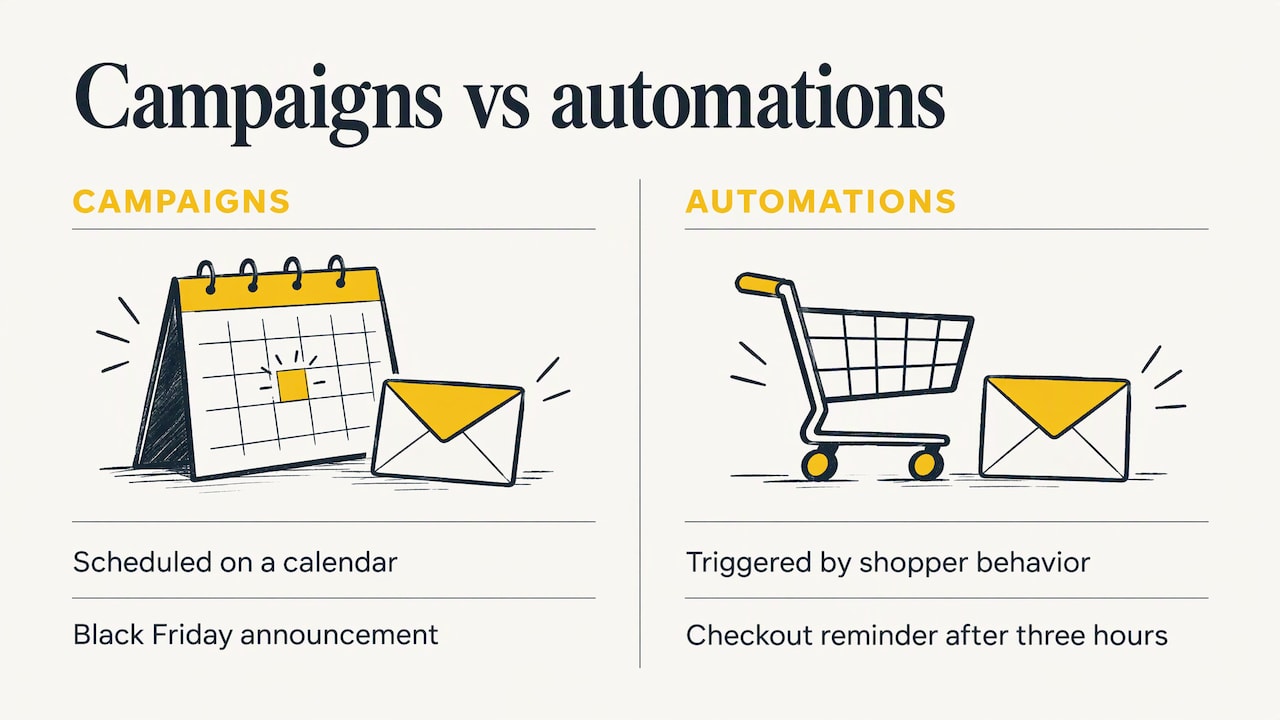
The key difference from a regular campaign is the trigger. Campaigns are scheduled on a calendar, while automations fire on customer behavior like viewing a product, signing up or leaving a cart. A Black Friday announcement is a campaign. A reminder sent three hours after someone left a checkout is an automation.
Where automation sits in the customer journey
A useful way to plan is to tie workflows to journey stages. One common model maps workflows to awareness, consideration, purchase, retention and advocacy, with the trigger acting as the green light for each sequence. In practice that looks like this:
- Before the first order: welcome, browse abandonment, cart and checkout recovery.
- Around the order: confirmation, shipping and delivery, product education.
- After the order: replenishment, cross-sell, review requests, loyalty.
- When engagement fades: re-engagement and win-back.
The first group lowers the cost of winning a customer. The rest raise what each customer is worth. Both matter for profit, which is why we treat email as part of one acquisition, conversion and retention system rather than a side channel.
The flows to build, in order
Brands that try to launch 15 flows at once usually launch none well. Shopify suggests starting with welcome, browse abandonment, abandoned checkout and post-purchase flows to cover acquisition through retention, then expanding. We agree with that order. For a deeper checklist of the customer actions that trigger each flow, this marketing automation checklist is a good companion.
| Flow | Trigger | Purpose | Typical first message |
|---|---|---|---|
| Welcome | Email or SMS signup | Introduce the brand, convert the first order | Immediately |
| Browse abandonment | Product viewed, nothing added to cart | Bring back a shopper who showed interest | 2 to 4 hours later |
| Cart or checkout abandonment | Cart or checkout started, no order | Recover a nearly completed sale | 1 to 4 hours later |
| Post-purchase | Order placed or delivered | Onboard, educate, prompt a review | 2 to 3 days after delivery |
| Replenishment | Predicted reorder window | Win the repeat order | Based on product use cycle |
| Win-back | No purchase or engagement for a set period | Reactivate lapsed buyers | Based on your repurchase rhythm |
| VIP or loyalty | Spend or order milestone | Reward your best customers | At the milestone |
The triggers and timing ranges above follow one published flow guide. Treat them as starting points and test your own, since a skincare brand and a furniture brand have very different buying cycles.
Welcome series
The welcome flow reaches people at their peak interest, so it often becomes the highest-earning flow in the account. Use it to say who you are, show best sellers, address the objection that stops first orders (shipping, returns, fit) and make a clear offer if your margins allow one. Three to four messages over about a week is a reasonable shape to test.
Browse and cart abandonment
These two flows recover intent. Browse abandonment fires when someone views a product without adding it. Cart abandonment fires when they add or start checkout and do not buy. Keep browse messages light (the product, a reason to choose it) and cart messages more direct (the items, shipping and returns info, a single button). For a full teardown of how to fix a leaking cart sequence, see our guide to abandoned cart emails that actually convert.
Post-purchase, replenishment and loyalty
This is where profit is made. A good post-purchase flow teaches the customer to use the product, which cuts returns and sets up the second order. For consumables, replenishment reminders work best when they use predicted reorder timing where available instead of a single fixed schedule. Loyalty and VIP messages tie to milestones. Our lifecycle email marketing guide goes through how these stages connect, and brands selling subscriptions should read our subscription retention playbook.
How to set up an automation
Every flow, whatever the platform, is built from the same parts. One platform’s help documentation names the core components as trigger, delay and message, with personalized fields such as customer name, cart items and recommendations. Add audience conditions and exit rules and you have a complete spec.
- Define the trigger. One specific event, for example “started checkout and did not place an order.”
- Set audience conditions. Who qualifies? Exclude recent purchasers, current subscribers to a competing flow and anyone who is suppressed.
- Choose delays. Space the messages by how urgent the decision is. Cart recovery is hours, win-back is weeks.
- Write the messages. One goal and one main call to action per email.
- Set exit rules. For cart recovery, one practical pattern is to follow up within 24 to 48 hours only if checkout is still incomplete and stop after purchase.
- Test before launch. Check triggers, timing, links and suppression logic with test orders on your own store.
Avoid flow collisions
The most common setup failure we see described is overlap: a shopper gets a browse email, a cart email and a promotional campaign on the same day. Give flows a priority order, add a rule that pauses lower-priority sends when a higher one is active, and cap total messages per person per week. Segmentation decides who enters a flow, and the workflow logic sequences messages through conditions and delays.
Segmentation and personalization that matter
Personalization is more than a first name. Dynamic segments update automatically from field-based, event-based and time-based criteria, so a shopper moves between groups as their behavior changes. The segments that usually earn their keep for ecommerce are:
- Lifecycle stage: prospect, first-time buyer, repeat buyer, lapsed.
- Purchase history: category bought, order value, product used.
- Behavior: products viewed, emails clicked, discount sensitivity.
- Recency: days since last order or last click.
Use conditional content so one flow serves several groups. A post-purchase email can show care instructions for the exact product ordered, and a win-back can lead with the category the customer bought before. Dynamic product recommendations do the same job inside a cart or replenishment message.
Measure profit, not just clicks
Before the metrics, the definitions we use with clients:
- CAC (customer acquisition cost): total marketing and sales spend divided by new customers won.
- LTV (lifetime value): the revenue, ideally gross profit, a customer generates over their relationship with you.
- ROAS (return on ad spend): revenue attributed to ads divided by ad spend.
- MER (marketing efficiency ratio): total revenue divided by total marketing spend, across every channel.
Email automation does not show up in ROAS, because it is not ad spend. It shows up in MER and LTV: flows lift revenue without a matching rise in media cost, which lowers your blended CAC. This is why retention work protects margin when ad costs climb.
Email metrics worth tracking
One flow guide recommends tracking revenue per recipient, placed-order rate, incremental revenue against a 5 to 10% holdout, second-order conversion, time to second order, flow share of email revenue, complaints, unsubscribes and contact pressure. It also warns that open rates can be inflated by Apple Mail Privacy Protection, so use them only as a rough directional signal.
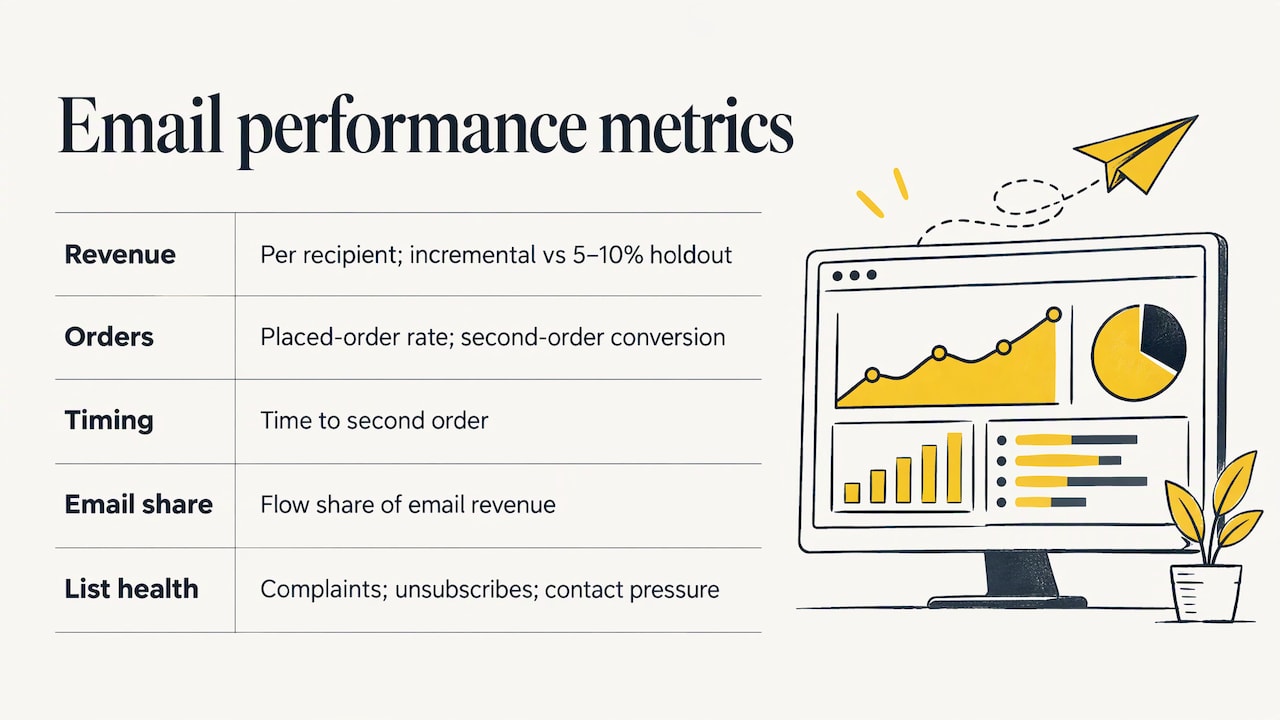
The holdout is the metric most brands skip. Keep a small random group out of a flow, then compare their revenue with the group that received it. That is the only clean way to know the flow caused the sales rather than collecting orders that were coming anyway. For a weekly reporting rhythm that ties channels to revenue, see this ecommerce reporting workflow.
Benchmarks, with context
Vendor benchmarks give a sense of scale, not a target. In one platform’s latest benchmark, abandoned-cart flows averaged $6.77 in revenue per recipient, with top flows reaching $13.70. Another report found that automations generated 30% of email revenue from 2% of sends and earned 16 times more per send than scheduled campaigns in its 2026 dataset. Your numbers depend on your list quality, price point and category, so set your own baseline before launch and compare against it.
A hypothetical example
This is an illustration, not a client result. Say a brand sends 10,000 cart-abandonment emails a month at $5.00 revenue per recipient. That is $50,000 in attributed revenue. If a 10% holdout shows that 30% of those orders would have happened anyway, the incremental revenue is $35,000. Judging on incremental figures keeps you from overcrediting the flow, and it shows where improving the sequence is worth the effort.
Protect deliverability and follow the rules
A flow only earns revenue if it lands in the inbox. Deliverability rests on engagement, sender reputation, SPF, DKIM, DMARC, list hygiene and bounce management. Mailbox providers have also tightened expectations: one guide summarizes the Gmail and Yahoo requirements for senders of 5,000 or more messages per day as SPF, DKIM, DMARC, one-click unsubscribe and spam complaints below 0.3%. Check the current rules with each provider, because they change.
Good habits that protect your sender reputation:
- Authenticate your sending domain before you launch any flow.
- Suppress contacts who do not engage. One guide suggests suppressing after three or four unsuccessful re-engagement sends.
- Keep transactional messages (order confirmations, shipping) separate from promotional content.
- Honor unsubscribes immediately and document how each contact opted in.
Privacy law depends on where your customers live. If you sell to the EU or UK, behavioral automation needs a consent or other lawful basis covering the message, and in the US you must follow CAN-SPAM and state privacy laws. Ask your legal counsel which rules apply to your list before you build segments around profiling.
Keep improving after launch
Automation is not set and forget. The same G2 guide recommends defining a baseline before launch, testing subject lines before timing or content, and checking weekly for the first 30 days, then monthly once the flow stabilizes. Test one variable at a time and judge it on revenue per recipient, not just clicks. Watch for falling click rates, drop-off between messages and unsubscribe spikes, which signal that a flow has gone stale.
Choosing an automation platform
Whatever platform you pick, check for the capabilities that matter to ecommerce. Look for reliable store integrations, lifecycle automations, segmentation, opt-in and unsubscribe controls, authentication guidance and reporting that ties automations to sales. Native integrations should pass product, order, customer, browse, cart and checkout data, because every trigger above depends on that data being accurate.
As your program grows, look for predictive segmentation, cross-channel orchestration, revenue attribution and LTV reporting, plus consent management and role-based permissions. If you want a broader view of strategy before choosing tools, our ecommerce email marketing guide and guide to repeat purchases cover it.
Our perspective
Most brands treat email automation as a template exercise: switch on the default flows, add a discount, move on. We see it as the cheapest lever for profitable growth, because every flow works on customers you already paid to acquire.
At Rozee Digital we work from our Ecommerce Acceleration System™, which treats acquisition, conversion and retention as one system. That matters here. If paid media brings in shoppers and the landing page converts them, but the welcome, cart and post-purchase flows are thin, you are paying full CAC and leaving LTV on the table.
Our work is led by senior strategists and we keep our client roster small on purpose, so the person who designs your flow logic is the person who reads your holdout results. We would rather build five flows that are measured incrementally than fifteen that nobody audits.
Tom
Next step: get senior help with your flows
If your flows are live but you cannot say what they add in incremental revenue, or your paid media costs are rising and retention is not absorbing the pressure, that is the work we do. Rozee Digital offers Klaviyo setup and optimisation for established Shopify, WooCommerce and Magento brands, covering flow strategy, segmentation and measurement, alongside paid media and creative.
We can start with an audit of your current flows and where they leak. To see the full range of services, visit Rozee Digital. You can also read how we approach ecommerce email automation flows that drive revenue.
FAQ
What is the difference between email automation and email campaigns?
Campaigns are sent on a schedule you choose, such as a sale announcement. Automations are triggered by what a shopper does, such as abandoning a cart or placing an order. Most healthy programs run both, with automations covering the always-on revenue.
Which automated emails should I set up first?
Start with welcome, browse abandonment, abandoned checkout and post-purchase flows. They cover the path from first visit to second order. Add replenishment, win-back and loyalty flows once the first four are measured and stable.
How soon should an abandoned cart email go out?
One flow guide suggests a first message 1 to 4 hours after the cart is abandoned, with a follow-up within 24 to 48 hours only if checkout is still incomplete. Test timing against your own revenue per recipient, since buying cycles differ by category.
How do I know if my automations are actually working?
Hold out a small random group, around 5 to 10%, and compare their revenue with recipients. Track revenue per recipient, second-order conversion and unsubscribes alongside it. Open rates alone can mislead because of mail privacy features.
Sources
- Ecommerce Email Automation Types, Examples, and Tips
- Ecommerce Marketing Automation Guide
- Email Automation for Ecommerce
- 7 Automated Email Workflows to Keep Up with Demand
- Email Marketing Automation for Ecommerce: 10 Flows to Run
- 10 Best Ecommerce Email Marketing Automations
- Set Up & Enable Email Automation
- Shopify Email Automation: A Step-by-Step Setup Guide
- 10 Steps to Effective Ecommerce Email Automation
- Automated email segmentation
- Ecommerce Reporting: Reports, KPIs and a Weekly Workflow
- Ecommerce Email Marketing: Automation, Tools & 2026 Trends
- Email Marketing Explained: The Comprehensive Guide
- Targeted Email Marketing Strategies
- How to Automate Email Marketing in 6 Steps
- Best Email Marketing Platform for Ecommerce
- Email Automation Solution Checklist